
होस्ट-साइड टेम्पलेट सब्स्टिट्यूशन
ऑब्फ़स्केशन पाइपलाइन को तोड़े बिना सर्वर पर रेंडर किए गए मानों (जैसे Go टेम्पलेट शैली के `{{ .Field }}` प्लेसहोल्डर) को VM-ऑब्फ़स्केटेड JavaScript में डालें।
समस्या
आपका बैकएंड (Go, Rails, Django, PHP, …) एक JavaScript फ़ाइल सर्व करता है जिसकी सामग्री का कुछ हिस्सा हर अनुरोध पर
रेंडर होना चाहिए - कोई API एंडपॉइंट, फ़ीचर फ़्लैग्स की सूची, शुरुआती स्टेट का डेटा, बिल्ड id, कोई nonce। आप JS को
vmObfuscation: true के साथ ऑब्फ़स्केट करते हैं, लेकिन आपको यह भी चाहिए कि टेम्पलेट इंजन ऑब्फ़स्केशन पूरा होने के
बाद ऑब्फ़स्केटेड आउटपुट में प्लेसहोल्डर बदले। reservedNames और reservedStrings प्लेसहोल्डर को आउटपुट में
दिखाई देने योग्य रखते हैं ताकि उसे बदला जा सके। इनके बिना, स्ट्रिंग प्लेसहोल्डर VM बाइटकोड में समा जाता है और आइडेंटिफ़ायर
प्लेसहोल्डर कई बदली हुई जगहों पर लिखा जाता है, इसलिए टेम्पलेट इंजन को या तो बदलने के लिए कुछ नहीं मिलता या वह आउटपुट तोड़ देता है।
इसके बजाय मानों को डेटा के रूप में लोड करने पर विचार करें
यदि संभव हो, तो सुरक्षित आउटपुट को बिल्कुल भी संपादित न करें: सुरक्षित बंडल चलने से पहले रनटाइम कॉन्फ़िगरेशन को डेटा
के रूप में लोड करें। इसे एक अलग स्क्रिप्ट में रखें या किसी प्रमाणीकृत एंडपॉइंट से लाएँ। इससे सुरक्षित आउटपुट अपरिवर्तित
रहता है, इसलिए vmSelfDefending चालू रह सकता है। ब्राउज़र तक पहुँचाया गया डेटा हर हाल में उस ब्राउज़र को दिखाई देता है।
नीचे दिए गए पैटर्न तब उपयोग करें जब मानों को सचमुच ऑब्फ़स्केटेड फ़ाइल में ही बदलना ज़रूरी हो।
Go उदाहरणों के बारे में एक नोट: वे ऑब्फ़स्केटेड आउटपुट पर सादा स्ट्रिंग रिप्लेसमेंट (strings.ReplaceAll / strings.NewReplacer)
करते हैं और अपनी एस्केपिंग खुद संभालते हैं, जैसा हर पैटर्न में दिखाया गया है। उन्हें Go के html/template पैकेज से नहीं
चलाया जाता - वह ऊपर से अपनी संदर्भ-आधारित JavaScript एस्केपिंग लागू करेगा, जिससे पेलोड दो बार एस्केप हो जाएगा। अगर आप
html/template से ही रेंडर करते हैं, तो मैनुअल एस्केपिंग हटा दें और इंजन को एक बार एस्केप करने दें।
कौन-सा विकल्प चुनें?
| सर्वर का मान… | उपयोग करें |
|---|---|
| एक कच्चा JS मान है (ऐरे, ऑब्जेक्ट, संख्या, boolean - कोई भी JSON मान) | पैटर्न 1 - reservedNames + आइडेंटिफ़ायर प्लेसहोल्डर |
| एक स्ट्रिंग है (आम मामला - रेंडर किया गया JSON, बिल्ड id, nonce) | पैटर्न 2 - reservedStrings + टेम्पलेट-लिटरल प्लेसहोल्डर |
| एक स्ट्रिंग है, जहाँ कोड को ES5 ही रहना है या आसपास के API को कोट की गई स्ट्रिंग लिटरल चाहिए | पैटर्न 3 - reservedStrings + कोट की गई स्ट्रिंग वाला प्लेसहोल्डर |
ऑब्फ़स्केशन के बाद का सब्स्टिट्यूशन vmSelfDefending: true के साथ असंगत है। इस रेसिपी के अंत में
संगतता नोट्स देखें।
पैटर्न 1 - आइडेंटिफ़ायर प्लेसहोल्डर के साथ reservedNames
किसके लिए सबसे अच्छा: कच्चे JS एक्सप्रेशन (ऐरे, ऑब्जेक्ट, संख्याएँ, …) डालने के लिए, कोट एस्केपिंग की किसी चिंता के बिना।
एक विशिष्ट आइडेंटिफ़ायर चुनें जो असली कोड से कभी न टकराए, उसे सीधे संदर्भित करें, और उससे मेल खाने वाला regex
reservedNames में जोड़ें। VM ऑब्फ़स्केशन में यह आइडेंटिफ़ायर reserved-expressions ऐरे से होकर जाता है और आउटपुट में
ज्यों का त्यों दिखाई देता है, उदाहरण के लिए:
आइडेंटिफ़ायर को एक पूरे JSON-सीरियलाइज़्ड एक्सप्रेशन से बदलें। मान को कोट्स या बैकटिक्स के अंदर पेस्ट न करें -
आइडेंटिफ़ायर किसी स्ट्रिंग लिटरल के अंदर नहीं है, इसलिए डाले गए मान को JS इंजन एक सामान्य एक्सप्रेशन के रूप में
पार्स करता है। किसी भरोसेमंद सीरियलाइज़र का उपयोग करें, स्क्रिप्ट HTML में एम्बेड होने पर < को एस्केप करें, और
कोट्स, बैकस्लैश, लाइन ब्रेक, बैकटिक्स और ${...} वाले मानों का परीक्षण करें।
पैटर्न 2 - टेम्पलेट-लिटरल प्लेसहोल्डर के साथ reservedStrings
किसके लिए सबसे अच्छा: Go / Jinja जैसे टेम्पलेट इंजन, जिन्हें {{ .Field }} जैसे डिलिमिटर चाहिए, जो बैकटिक्स में
लपेटे जाने पर वैध JS टेक्स्ट बन जाते हैं।
प्लेसहोल्डर एक single-quasi, बिना इंटरपोलेशन वाले टेम्पलेट लिटरल के अंदर रहता है। VM ऑब्फ़स्केशन में यह reserved-expressions ऐरे से होकर जाता है, जिससे आउटपुट में बैकटिक वाला कच्चा रूप बना रहता है।
सोर्स
ऑब्फ़स्केटर विकल्प
UI
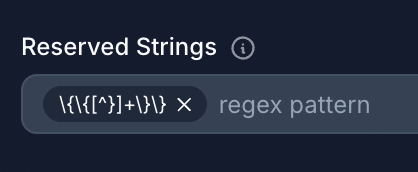
ऊपर दिए गए सोर्स से {{.Config.FeatureFlags}} प्लेसहोल्डर को सुरक्षित रखने के लिए यह regex Reserved Strings
फ़ील्ड में जोड़ें - एकल बैकस्लैश के साथ। UI मान को ज्यों का त्यों सहेजता है, इसलिए JS कोड के विपरीत यहाँ बैकस्लैश
दोहरे नहीं किए जाते:
API
ऑब्फ़स्केशन के बाद
प्लेसहोल्डर आसपास के बैकटिक्स सहित बाइट-दर-बाइट सुरक्षित रहता है।
होस्ट-साइड सब्स्टिट्यूशन
{{.Config.FeatureFlags}} को टेम्पलेट लिटरल के लिए एस्केप की गई JSON स्ट्रिंग से बदलें। बैकटिक्स में अंदर के "
को एस्केप करने की ज़रूरत नहीं होती, लेकिन पेलोड के अंदर बैकस्लैश, बैकटिक या ${ फिर भी लिटरल को बदल या समाप्त कर
सकते हैं, इसलिए इन तीनों को एस्केप करें:
रनटाइम पर: JSON.parse(`{"newCheckout":true,"darkMode":false}`) - काम करता है।
स्ट्रिंग मानों के लिए सिंगल/डबल कोट्स की तुलना में टेम्पलेट लिटरल्स क्यों बेहतर हैं? बैकटिक्स में JSON पेलोड के
अंदर " को एस्केप करने की ज़रूरत नहीं होती। यह इसलिए मायने रखता है क्योंकि सर्वर पर रेंडर किए गए अधिकांश मान JSON
होते हैं, और JSON डबल कोट्स से भरा होता है। डबल-कोट वाले प्लेसहोल्डर में आपको अंदर के हर " को एस्केप करना होगा
(पैटर्न 3 देखें); बैकटिक्स के साथ पेलोड में केवल कभी-कभार आने वाले बैकस्लैश, बैकटिक्स और ${ को एस्केप करना होता है।
पैटर्न 3 - कोट वाले स्ट्रिंग प्लेसहोल्डर के साथ reservedStrings
किसके लिए सबसे अच्छा: ऐसा सोर्स कोड जिसे ES5 में ही रहना है (टेम्पलेट लिटरल्स के बिना), या ऐसे मामले जहाँ आसपास का API एक सामान्य स्ट्रिंग लिटरल की अपेक्षा करता है।
प्लेसहोल्डर सिंगल या डबल कोट वाला स्ट्रिंग लिटरल है। VM ऑब्फ़स्केशन में यह reserved-strings ऐरे से होकर जाता है,
जो JSON.stringify से सीरियलाइज़ किए गए JS ऐरे के रूप में आउटपुट होता है - इनपुट में कोट की शैली चाहे जो हो, हमेशा
डबल कोट में।
सोर्स
ऑब्फ़स्केटर विकल्प
UI
ऊपर दिए गए सोर्स से {{.Page.Tags}} प्लेसहोल्डर को सुरक्षित रखने के लिए यह regex Reserved Strings फ़ील्ड में जोड़ें -
एकल बैकस्लैश के साथ। UI मान को ज्यों का त्यों सहेजता है, इसलिए JS कोड के विपरीत यहाँ बैकस्लैश दोहरे नहीं किए जाते:
API
ऑब्फ़स्केशन के बाद
होस्ट-साइड सब्स्टिट्यूशन
चूँकि प्लेसहोल्डर डबल कोट वाली JS स्ट्रिंग के अंदर है, इसलिए डाले गए JSON पेलोड के बैकस्लैश और अंदर के " अक्षरों
को एस्केप करना ज़रूरी है:
परिणामी आउटपुट:
रनटाइम पर: JSON.parse("[\"news\",\"tech\",\"release\"]") → ["news","tech","release"]।
अगर आप एस्केपिंग भूल जाते हैं, तो ब्राउज़र को असंतुलित कोट्स मिलेंगे और वह SyntaxError देगा। पैटर्न 2 बैकटिक्स का
उपयोग करके डबल कोट्स की समस्या से पूरी तरह बच जाता है।
एक ही प्रोग्राम में कई प्लेसहोल्डर
तीनों पैटर्न एक साथ काम करते हैं। अल्टरनेशन वाला एक ही reservedStrings regex आपके टेम्पलेट इंजन द्वारा बनाए गए
हर प्लेसहोल्डर रूप से मेल खा सकता है - यहाँ {{ .Field }} और %{ .Field } दोनों शैलियों से:
आप एक ही सोर्स में आइडेंटिफ़ायर प्लेसहोल्डर (कच्चे JS मानों के लिए) और स्ट्रिंग प्लेसहोल्डर (रेंडर किए गए JSON के लिए) मिला सकते हैं - हर प्लेसहोल्डर के लिए इस आधार पर चुनें कि सर्वर वास्तव में क्या डालेगा।
संगतता नोट्स
vmSelfDefending ऑब्फ़स्केशन के बाद के सब्स्टिट्यूशन को तोड़ देता है
VM Self Defending बिल्ड के बाद ऑब्फ़स्केटेड आउटपुट में किसी भी बदलाव का पता लगा लेता है, वैध टेम्पलेट सब्स्टिट्यूशन सहित, और तब सुरक्षित कोड चलने से इनकार कर देता है।
अगर आप होस्ट-साइड टेम्पलेट सब्स्टिट्यूशन पर निर्भर हैं, तो vmSelfDefending: false सेट करें। selfDefending को भी बंद
रखें: VM ऑब्फ़स्केशन में इसका कोई असर नहीं होता, और VM के बिना यह भी आउटपुट में किसी भी बदलाव की अनुमति नहीं देता।
प्लेसहोल्डर सुझाव
- आइडेंटिफ़ायर और स्ट्रिंग्स के लिए एक ही प्लेसहोल्डर का दोबारा उपयोग न करें।
__TOKEN__जैसा reserved नाम और__TOKEN__से मेल खाने वाली reserved स्ट्रिंग दो अलग कोड पथ दर्शाते हैं (reserved-expressions ऐरे बनाम reserved-strings ऐरे)। हर एक के लिए अलग टेक्स्ट रूप अपनाएँ - उदाहरण के लिए, आइडेंटिफ़ायर प्लेसहोल्डर के लिएUPPER_SNAKEपरिपाटी और स्ट्रिंग प्लेसहोल्डर के लिए डिलिमिटर में लिपटा रूप ({{ ... }},%{...},<<<...>>>)। इस तरह एक regex की गलती चुपचाप दूसरे से मेल नहीं खा सकती। reservedStringsके regex कच्चे स्ट्रिंग मानों पर चलते हैं। regex का मिलान स्ट्रिंग के रनटाइम मान से होता है, सोर्स टेक्स्ट से नहीं।\{\{[^}]+\}\}उन स्ट्रिंग्स से मेल खाता है जिनमें{{.something}}(या कोई भी अन्य{{...}}रूप) शामिल हो। अगर आपका प्लेसहोल्डर अतिरिक्त सामग्री में लिपटा हो सकता है ("prefix-{{.Field}}-suffix"), तो regex फिर भी मेल खाता है लेकिन पूरी स्ट्रिंग सुरक्षित रहती है - अपना सब्स्टिट्यूशन उसी के अनुसार योजना बनाकर करें।- किसी भी टेम्पलेटिंग इंजन के साथ काम करता है। हालाँकि उदाहरणों में Go सिंटैक्स का उपयोग है, javascript-obfuscator इंटीग्रेशन में कुछ भी Go-विशिष्ट नहीं है। जो भी ऑब्फ़स्केटर के आउटपुट पर स्ट्रिंग स्तर का रिप्लेसमेंट कर सके, वह काम करेगा: Rails ERB, Django, PHP short-tags, CI पाइपलाइन में sed आदि। ऐसे डिलिमिटर चुनें जो आपका इंजन स्वाभाविक रूप से बनाता हो और जो असली JS सिंटैक्स से न टकराएँ।