
Host-side Template Substitution
Inject server-rendered values (e.g. Go template-style `{{ .Field }}` placeholders) into VM-obfuscated JavaScript without breaking the obfuscation pipeline.
The problem
Your backend (Go, Rails, Django, PHP, …) serves a JavaScript file whose contents must be partially rendered
per-request - an API endpoint, a list of feature flags, an initial state blob, a build id, a nonce. You obfuscate the
JS with vmObfuscation: true, but you also need the template engine to substitute placeholders in the obfuscated
output after obfuscation finishes. reservedNames and reservedStrings keep a placeholder visible in the output
so it can be replaced. Without them, a string placeholder is absorbed into VM bytecode and an identifier placeholder is
emitted in several rewritten places, so the template engine either finds nothing to substitute or breaks the output.
Consider loading the values as data instead
If you can, avoid editing the protected output at all: load runtime configuration as data before the protected bundle
runs. Keep it in a separate script or fetch it from an authenticated endpoint. This preserves the protected output, so
vmSelfDefending can remain enabled. Data delivered to a browser is visible to that browser either way.
Use the patterns below when the values really have to be substituted into the obfuscated file.
A note on the Go samples: they do a plain string replacement (strings.ReplaceAll / strings.NewReplacer) on
the obfuscated output and handle their own escaping, shown per pattern. They are not run through Go's html/template
package - that would apply its own contextual JavaScript escaping on top, double-escaping the payload. If you do render
through html/template, drop the manual escaping and let the engine escape once.
Which option do I pick?
| Server value is… | Use |
|---|---|
| A raw JS value (array, object, number, boolean - any JSON value) | Pattern 1 - reservedNames + identifier placeholder |
| A string (the common case - rendered JSON, a build id, a nonce) | Pattern 2 - reservedStrings + template-literal placeholder |
| A string, where the code must stay ES5 or the surrounding API needs a quoted string literal | Pattern 3 - reservedStrings + quoted-string placeholder |
Post-obfuscation substitution is incompatible with vmSelfDefending: true. See
Compatibility notes at the end of this recipe.
Pattern 1 - reservedNames with an identifier placeholder
Best for: injecting raw JS expressions (arrays, objects, numbers, …) with zero quote-escaping concerns.
Pick a distinctive identifier that will never collide with real code, reference it directly, and list a regex matching
it in reservedNames. Under VM obfuscation, the identifier is routed through the reserved-expressions array and
appears verbatim in the output, for example:
Replace the identifier with a complete JSON-serialized expression. Do not paste the value inside quotes or backticks -
the identifier is not inside a string literal, so the injected value is parsed by the JS engine as an ordinary
expression. Use a trusted serializer, escape < when the script is embedded in HTML, and test values containing
quotes, backslashes, line breaks, backticks, and ${...}.
Pattern 2 - reservedStrings with a template-literal placeholder
Best for: Go / Jinja-style template engines that require delimiters like {{ .Field }} which happen to be valid JS
text when wrapped in backticks.
The placeholder lives inside a single-quasi, non-interpolated template literal. Under VM obfuscation this routes through the reserved-expressions array, preserving the raw backtick form in the output.
Source
Obfuscator options
UI
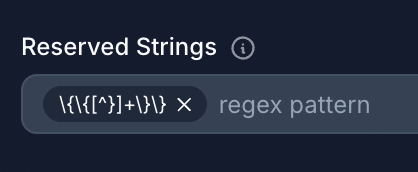
To reserve the {{.Config.FeatureFlags}} placeholder from the source above, add this regex to the Reserved Strings
field - with single backslashes. The UI stores the value verbatim, so unlike in JS code the backslashes are not
doubled:
API
After obfuscation
The placeholder is preserved byte-for-byte, including the surrounding backticks.
Host-side substitution
Replace {{.Config.FeatureFlags}} with a JSON string escaped for a template literal. Backticks do not require inner
" escaping, but a backslash, a backtick, or ${ inside the payload would still change or end the literal, so escape
those three:
At runtime: JSON.parse(`{"newCheckout":true,"darkMode":false}`) - works.
Why prefer template literals over single/double quotes for string values? Backticks do not require escaping "
inside the JSON payload. This matters because most server-rendered values are JSON, and JSON is full of double
quotes. With a double-quoted placeholder you would need to escape every inner " (see Pattern 3); with backticks
the payload only needs its rare backslashes, backticks and ${ escaped.
Pattern 3 - reservedStrings with a quoted string placeholder
Best for: source code that must stay in ES5 (no template literals), or cases where the surrounding API expects a regular string literal.
The placeholder is a single- or double-quoted string literal. Under VM obfuscation it routes through the
reserved-strings array, which is emitted as a JSON.stringify-serialized JS array - always double-quoted regardless
of the input quote style.
Source
Obfuscator options
UI
To reserve the {{.Page.Tags}} placeholder from the source above, add this regex to the Reserved Strings field -
with single backslashes. The UI stores the value verbatim, so unlike in JS code the backslashes are not doubled:
API
After obfuscation
Host-side substitution
Because the placeholder sits inside a double-quoted JS string, the injected JSON payload must have its backslashes and
inner " characters escaped:
Resulting output:
At runtime: JSON.parse("[\"news\",\"tech\",\"release\"]") → ["news","tech","release"].
If you forget the escaping, the browser will see unbalanced quotes and throw a SyntaxError. Pattern 2 sidesteps the
double quotes entirely by using backticks.
Multiple placeholders in one program
All three patterns compose. A single reservedStrings regex with an alternation can match every placeholder shape your
template engine emits - here, both {{ .Field }} and %{ .Field } styles:
You can mix identifier placeholders (for raw JS values) and string placeholders (for rendered JSON) in the same source - pick per-placeholder based on what the server will actually inject.
Compatibility notes
vmSelfDefending breaks post-obfuscation substitution
VM Self Defending detects any change to the obfuscated output after it is built, including a legitimate template substitution, and the protected code then refuses to run.
If you rely on host-side template substitution, set vmSelfDefending: false. Leave selfDefending off as well: it
has no effect under VM obfuscation, and without VM it also forbids any change to the output.
Placeholder tips
- Don't reuse placeholders across identifiers and strings. A reserved name like
__TOKEN__and a reserved string matching__TOKEN__describe two different code paths (reserved-expressions array vs. reserved-strings array). Use distinct textual shapes for each - for example, anUPPER_SNAKEconvention for identifier placeholders and a delimiter-wrapped shape ({{ ... }},%{...},<<<...>>>) for string placeholders. That way a bug in one regex can't silently match the other. reservedStringsregexes run against raw string values. The regex is matched against the runtime value of the string, not the source text.\{\{[^}]+\}\}matches strings that contain{{.something}}(or any other{{...}}shape). If your placeholder might be wrapped in extra content ("prefix-{{.Field}}-suffix"), the regex still matches but the whole string is preserved - plan your substitution accordingly.- Works with any templating engine. Although the examples use Go syntax, nothing in the javascript-obfuscator integration is Go-specific. Anything that can do a string-level replacement on the obfuscator's output will work: Rails ERB, Django, PHP short-tags, sed in a CI pipeline, etc. Choose delimiters that your engine emits naturally and that don't collide with real JS syntax.